> ## Documentation Index
> Fetch the complete documentation index at: https://liquidai-alay2shah-sync-notebook-snippets.mintlify.site/llms.txt
> Use this file to discover all available pages before exploring further.
# Generate Structured Recipes with Constrained Output
Browse the complete example on GitHub
This example demonstrates **constrained generation** with LeapSDK on Android. Instead of generating free-form text, the RecipeGenerator app produces structured JSON output that follows a predefined schema, ensuring consistent and parseable results.
Constrained generation is essential for building reliable AI-powered applications where the output needs to integrate with downstream systems or databases. This example shows how to enforce structure while maintaining creative and useful AI-generated content.
## What's inside?
The RecipeGenerator demonstrates advanced LeapSDK capabilities:
* **Structured Output Generation** - Enforce JSON schema constraints on model outputs
* **Automatic Model Downloading** - Models download automatically via `LeapDownloader` on first run
* **Constrained Decoding** - Guide the model to produce valid, parseable data structures
* **Schema Validation** - Ensure generated recipes follow a specific format
* **Type Safety** - Parse AI outputs directly into Kotlin data classes with kotlinx.serialization
* **@Generatable Annotation** - Use LeapSDK's annotation for simplified structured output generation
* **Production-ready Pattern** - Integrate AI outputs with databases and business logic
* **Practical Use Case** - Generate recipes with ingredients, steps, and metadata
This pattern is applicable to many use cases beyond recipes: generating product catalogs, form data, API responses, database entries, and more.
## What is constrained generation?
**Constrained generation** refers to the ability to enforce specific formatting or structural requirements on model outputs. Instead of generating free-form text, the model produces outputs that conform to a predefined schema or pattern.
**Benefits:**
* **Reliability** - Guaranteed parseable output every time
* **Type Safety** - Direct integration with typed programming languages
* **Validation** - Automatic schema compliance
* **Downstream Integration** - Feed structured data into databases, APIs, or UIs
* **Error Reduction** - Eliminate parsing errors from inconsistent formats
**Common use cases:**
* JSON API responses
* Database records
* Form submissions
* Product catalogs
* Configuration files
* Structured reports
Read the complete guide in the official Leap documentation
## Environment setup
Before running this example, ensure you have the following:
Download and install [Android Studio](https://developer.android.com/studio) (latest stable version recommended).
Make sure you have:
* Android SDK installed
* An Android device or emulator configured
* USB debugging enabled (for physical devices)
This example requires:
* **Minimum SDK**: API 24 (Android 7.0)
* **Target SDK**: API 34 or higher
* **Kotlin**: 1.9.0 or higher
* **LeapSDK**: 0.9.4 or higher
* **Internet connectivity**: Required for first-time model download
This example uses **LeapSDK 0.9.4+** with automatic model downloading capabilities.
**Automatic Model Management**
The app uses `LeapDownloader` to automatically download and cache the **LFM2-700M** model on first run:
* On first launch, the model downloads automatically from Leap Model Library
* Models are cached locally for subsequent app launches
* No manual ADB push or file transfer required
* Internet connectivity is required only for the initial download
**First Run Experience:**
1. Launch the app (internet connection required)
2. The model downloads automatically (may take 2-5 minutes depending on connection)
3. Once cached, subsequent launches work offline
4. The model persists across app restarts
**Manual Deployment (Alternative)**
If you prefer manual deployment or need offline-first installation, you can still use ADB:
```bash theme={"theme":{"light":"github-light","dark":"github-dark"}}
# Push the model bundle to device storage
adb push LFM2-700M.bundle /data/local/tmp/liquid/
# Update app code to load from this path instead of using LeapDownloader
```
Add the required dependencies to your app-level `build.gradle.kts`:
```kotlin theme={"theme":{"light":"github-light","dark":"github-dark"}}
dependencies {
// LeapSDK for constrained generation (0.9.4+)
implementation("ai.liquid.leap:leap-sdk:0.9.7")
// Kotlin serialization for type-safe parsing
implementation("org.jetbrains.kotlinx:kotlinx-serialization-json:1.6.0")
// Jetpack Compose (if using Compose UI)
implementation(platform("androidx.compose:compose-bom:2024.01.00"))
implementation("androidx.compose.ui:ui")
implementation("androidx.compose.material3:material3")
// ViewModel
implementation("androidx.lifecycle:lifecycle-viewmodel-ktx:2.7.0")
}
```
**Also enable the Kotlin serialization plugin** in your app-level `build.gradle.kts`:
```kotlin theme={"theme":{"light":"github-light","dark":"github-dark"}}
plugins {
id("org.jetbrains.kotlin.plugin.serialization") version "1.9.0"
}
```
## How to run it
Follow these steps to generate structured recipes:
1. **Clone the repository**
```bash theme={"theme":{"light":"github-light","dark":"github-dark"}}
git clone https://github.com/Liquid4All/LeapSDK-Examples.git
cd LeapSDK-Examples/Android/RecipeGenerator
```
2. **Open in Android Studio**
* Launch Android Studio
* Select "Open an existing project"
* Navigate to the `RecipeGenerator` folder and open it
3. **Gradle sync**
* Wait for Gradle to sync all dependencies
* Ensure LeapSDK 0.9.7 is downloaded
4. **Run the app**
* Connect your Android device or start an emulator
* **Ensure internet connectivity** (required for first-time model download)
* Click "Run" or press `Shift + F10`
* Select your target device
5. **First launch - model download**
* On first run, the app will automatically download the LFM2-700M model
* This may take 2-5 minutes depending on your connection
* A loading indicator will show download progress
* The model is cached for future use
6. **Generate recipes**
* Enter ingredients or a dish name (e.g., "pasta carbonara", "chocolate chip cookies")
* Tap "Generate Recipe"
* The app will produce a structured recipe with ingredients, steps, and metadata
* All output will be valid JSON conforming to the recipe schema
**After First Run**: The model is cached locally. Subsequent app launches work offline and start immediately without downloading.
## Code walkthrough
The core business logic is implemented in `MainActivityViewModel.kt`. Here's how it works:
### Define the Recipe Schema
First, define the data structure you want the AI to generate:
```kotlin theme={"theme":{"light":"github-light","dark":"github-dark"}}
@Serializable
data class Recipe(
val name: String,
val description: String,
val servings: Int,
val prepTime: String,
val cookTime: String,
val difficulty: String,
val ingredients: List,
val instructions: List,
val tags: List
)
@Serializable
data class Ingredient(
val item: String,
val amount: String,
val unit: String
)
```
### Configure Constrained Generation
Set up the LeapSDK to enforce the schema:
```kotlin theme={"theme":{"light":"github-light","dark":"github-dark"}}
class MainActivityViewModel : ViewModel() {
private lateinit var model: LeapModel
fun initializeModel() {
viewModelScope.launch {
// Download and load the model automatically (LeapSDK 0.9.4+)
model = LeapDownloader.downloadAndLoadModel(
modelName = "lfm2-700m",
onProgress = { progress ->
// Update UI with download progress
_downloadProgress.value = progress
}
)
// Alternative: Load from local bundle if already cached
// model = LeapSDK.loadModelFromBundle(
// path = "/data/local/tmp/liquid/lfm2-700m.bundle"
// )
configureConstraints()
}
}
private fun configureConstraints() {
// Define the JSON schema for recipes
val recipeSchema = """
{
"type": "object",
"properties": {
"name": {"type": "string"},
"description": {"type": "string"},
"servings": {"type": "integer"},
"prepTime": {"type": "string"},
"cookTime": {"type": "string"},
"difficulty": {"type": "string", "enum": ["easy", "medium", "hard"]},
"ingredients": {
"type": "array",
"items": {
"type": "object",
"properties": {
"item": {"type": "string"},
"amount": {"type": "string"},
"unit": {"type": "string"}
},
"required": ["item", "amount", "unit"]
}
},
"instructions": {
"type": "array",
"items": {"type": "string"}
},
"tags": {
"type": "array",
"items": {"type": "string"}
}
},
"required": ["name", "description", "servings", "ingredients", "instructions"]
}
""".trimIndent()
// Configure constrained generation
model.setConstraint(
type = ConstraintType.JSON_SCHEMA,
schema = recipeSchema
)
}
}
}
```
### Generate Structured Recipes
Create a function to generate recipes with guaranteed structure:
```kotlin theme={"theme":{"light":"github-light","dark":"github-dark"}}
fun generateRecipe(userInput: String) {
viewModelScope.launch {
val prompt = """
Generate a detailed recipe for: $userInput
Include the recipe name, description, servings, preparation time,
cooking time, difficulty level, complete ingredient list with amounts,
step-by-step instructions, and relevant tags.
""".trimIndent()
try {
// Generate with schema constraints
val jsonOutput = model.generate(
prompt = prompt,
maxTokens = 1000
)
// Parse the guaranteed-valid JSON
val recipe = Json.decodeFromString(jsonOutput)
// Use the structured data
_recipeState.value = RecipeState.Success(recipe)
} catch (e: Exception) {
_recipeState.value = RecipeState.Error(e.message ?: "Failed to generate recipe")
}
}
}
```
### Alternative: Using @Generatable Annotation
LeapSDK 0.9.4+ provides the `@Generatable` annotation for simplified structured output:
```kotlin theme={"theme":{"light":"github-light","dark":"github-dark"}}
@Generatable
data class Recipe(
val name: String,
val description: String,
val servings: Int,
val prepTime: String,
val cookTime: String,
val difficulty: String,
val ingredients: List,
val instructions: List,
val tags: List
)
// Generate directly with type inference
fun generateRecipeSimplified(userInput: String) {
viewModelScope.launch {
val recipe = model.generate(
prompt = "Generate a recipe for: $userInput"
)
// Recipe is automatically parsed and type-safe
_recipeState.value = RecipeState.Success(recipe)
}
}
```
The `@Generatable` annotation automatically creates the JSON schema from your Kotlin data class, eliminating manual schema definition.
### Resource Cleanup
**Important:** Always clean up model resources properly in your ViewModel:
```kotlin theme={"theme":{"light":"github-light","dark":"github-dark"}}
class MainActivityViewModel : ViewModel() {
private lateinit var model: LeapModel
override fun onCleared() {
super.onCleared()
// Unload model asynchronously to avoid ANR
// Do NOT use runBlocking here - it blocks the main thread
CoroutineScope(Dispatchers.IO).launch {
try {
model.unload()
} catch (e: Exception) {
Log.e("RecipeViewModel", "Error unloading model", e)
}
}
}
}
```
**Best practices:**
* Never use `runBlocking` in `onCleared()` - it causes ANRs (Application Not Responding)
* Use `CoroutineScope(Dispatchers.IO).launch` for async cleanup
* Always catch exceptions to prevent crashes during cleanup
* This ensures smooth app shutdown without blocking the UI
### Display the Recipe
The structured output can be easily rendered in the UI:
```kotlin theme={"theme":{"light":"github-light","dark":"github-dark"}}
@Composable
fun RecipeDisplay(recipe: Recipe) {
Column(modifier = Modifier.padding(16.dp)) {
Text(text = recipe.name, style = MaterialTheme.typography.headlineMedium)
Text(text = recipe.description, style = MaterialTheme.typography.bodyMedium)
Row {
Text("Servings: ${recipe.servings}")
Spacer(modifier = Modifier.width(16.dp))
Text("Difficulty: ${recipe.difficulty}")
}
Text("Prep: ${recipe.prepTime} | Cook: ${recipe.cookTime}")
Text("Ingredients:", style = MaterialTheme.typography.titleMedium)
recipe.ingredients.forEach { ingredient ->
Text("• ${ingredient.amount} ${ingredient.unit} ${ingredient.item}")
}
Text("Instructions:", style = MaterialTheme.typography.titleMedium)
recipe.instructions.forEachIndexed { index, step ->
Text("${index + 1}. $step")
}
FlowRow {
recipe.tags.forEach { tag ->
Chip(text = tag)
}
}
}
}
```
## Results
The RecipeGenerator produces consistently formatted recipes:
**Example Output:**
```json theme={"theme":{"light":"github-light","dark":"github-dark"}}
{
"name": "Classic Chocolate Chip Cookies",
"description": "Soft and chewy chocolate chip cookies with a perfect golden-brown exterior",
"servings": 24,
"prepTime": "15 minutes",
"cookTime": "12 minutes",
"difficulty": "easy",
"ingredients": [
{"item": "all-purpose flour", "amount": "2.25", "unit": "cups"},
{"item": "butter", "amount": "1", "unit": "cup"},
{"item": "granulated sugar", "amount": "0.75", "unit": "cup"},
{"item": "brown sugar", "amount": "0.75", "unit": "cup"},
{"item": "eggs", "amount": "2", "unit": "large"},
{"item": "vanilla extract", "amount": "2", "unit": "tsp"},
{"item": "baking soda", "amount": "1", "unit": "tsp"},
{"item": "salt", "amount": "1", "unit": "tsp"},
{"item": "chocolate chips", "amount": "2", "unit": "cups"}
],
"instructions": [
"Preheat oven to 375°F (190°C)",
"Cream together butter and both sugars until light and fluffy",
"Beat in eggs one at a time, then add vanilla extract",
"In a separate bowl, whisk together flour, baking soda, and salt",
"Gradually blend dry ingredients into butter mixture",
"Stir in chocolate chips",
"Drop rounded tablespoons of dough onto ungreased cookie sheets",
"Bake for 9-11 minutes or until golden brown",
"Cool on baking sheet for 2 minutes before transferring to a wire rack"
],
"tags": ["dessert", "baking", "cookies", "chocolate", "classic"]
}
```
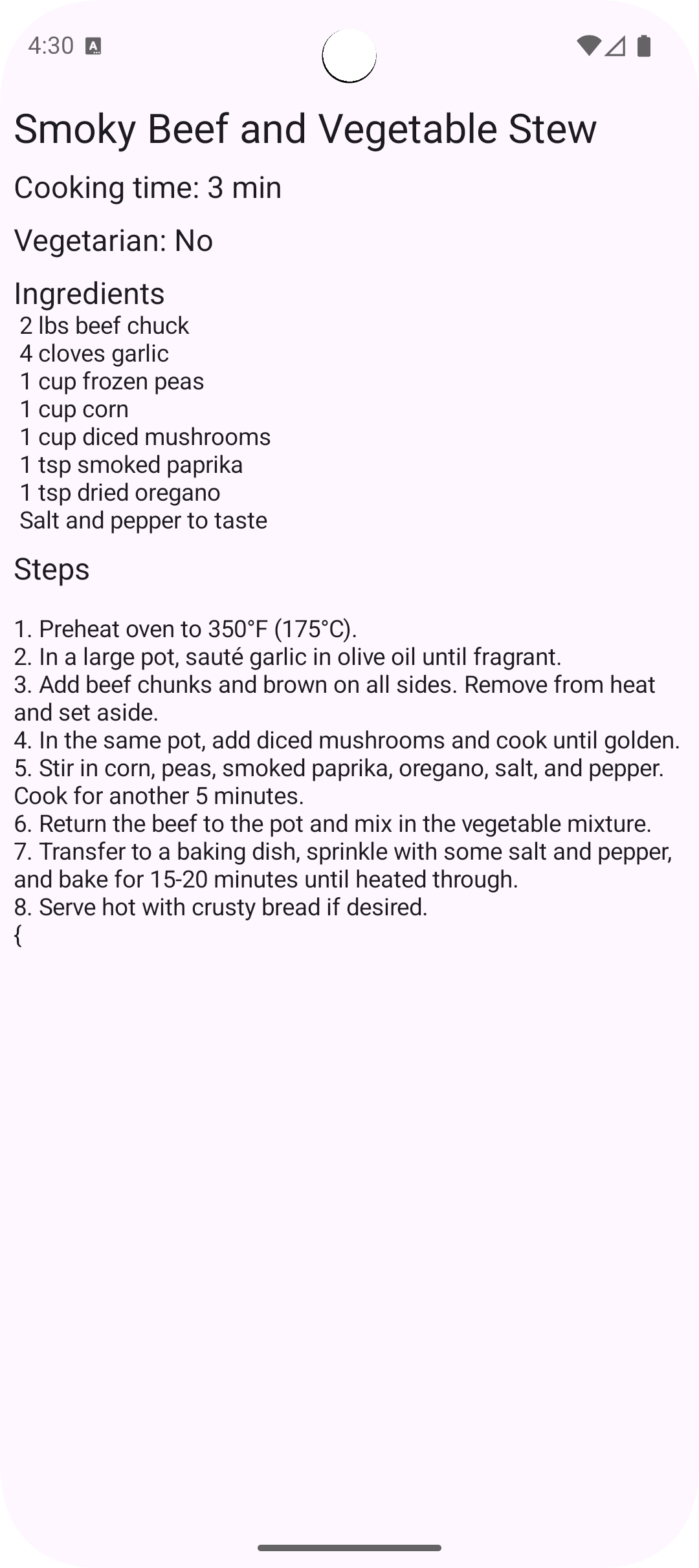
The interface shows the structured recipe data rendered beautifully with proper formatting, making it easy to read and follow.
## Further improvements
Here are some ways to extend this example:
* **Database integration** - Save generated recipes to Room database
* **Multiple cuisines** - Add cuisine type selector (Italian, Mexican, Asian, etc.)
* **Dietary restrictions** - Filter for vegan, gluten-free, keto, etc.
* **Nutritional information** - Extend schema to include calories, protein, carbs
* **Scaling calculator** - Adjust ingredient amounts based on servings
* **Shopping list generation** - Extract ingredients into a shareable shopping list
* **Image generation** - Integrate with image models to visualize the dish
* **Recipe sharing** - Export as PDF or share via social media
* **User ratings** - Allow users to rate and review generated recipes
* **Variation generator** - Generate recipe variations (e.g., "make it vegan")
* **Meal planning** - Combine multiple recipes into weekly meal plans
* **Ingredient substitution** - Suggest alternatives for missing ingredients
## Need help?
Connect with the community and ask questions about this example.